
How to save thousands on Advertising with MCMetrics
Reading Time: 5 minutes
To grow your Minecraft server, you need 3 things:
- A consistent number of new players joining your server
- Advertisements that result in new players joining
- Players need to generate more revenue than you are spending on advertisements (otherwise, you will lose money!)
The basic idea here is that you want to spend more money on ads that generate a profit, and less money on ads that lose you money.
A common problem is that server owners don't have a way to measure #3. If they don't know how to measure it, they will end up wasting money thousands of dollars and prevent their server from growing.
Solution: MCMetrics Domain Campaigns
MCMetrics offers an easy solution for you to measure which ads are performing the best. It only takes a couple of minutes to set up (and save you thousands of dollars down the line!).
Step 1: Separate Domains
Odds are, all of your ads are using your server's domain (or "IP") and telling your players to join it. For example, pixelcraft.com.
To start tracking ads with MCMetrics, you need to use a different subdomain, domain, or IP address for each advertisement source. For example:
- For TikTok, use join.pixelcraft.com
- For YouTube, use mc.pixelcraft.com
- For server list #1, use play.pixelcraft.com
- For server list #2, use hub.pixelcraft.com
(Talk to your server host if you need help setting up different domains/subdomains. It's not difficult to set up.)
Step 2: MCMetrics Dashboard
The MCMetrics plugin will track the join domain of every single player out of the box. All you need to do is open the Campaigns page on mcmetrics.net and click "New Campaign".
For example, for TikTok ads mentioned earlier:
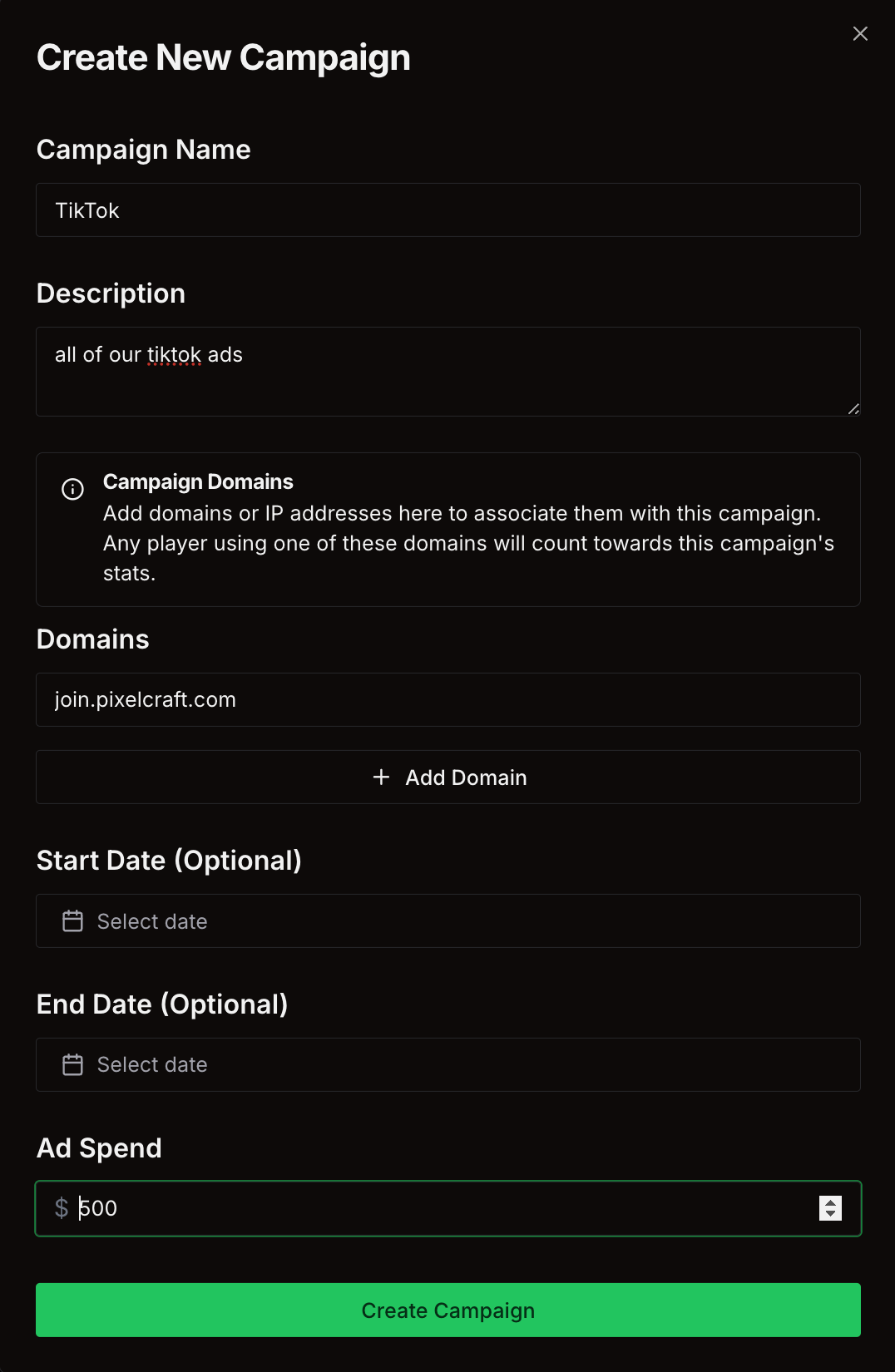
If you spend any money on this ad (for TikTok, this might include paying someone to record and upload videos), add this value to "Ad Spend". If you don't spend money, leave it at $0.
Step 3: Campaign Results
Once you created your campaign and updated the domains for your ad(s), you can click "View" on MCMetrics to open the Campaign Results page:
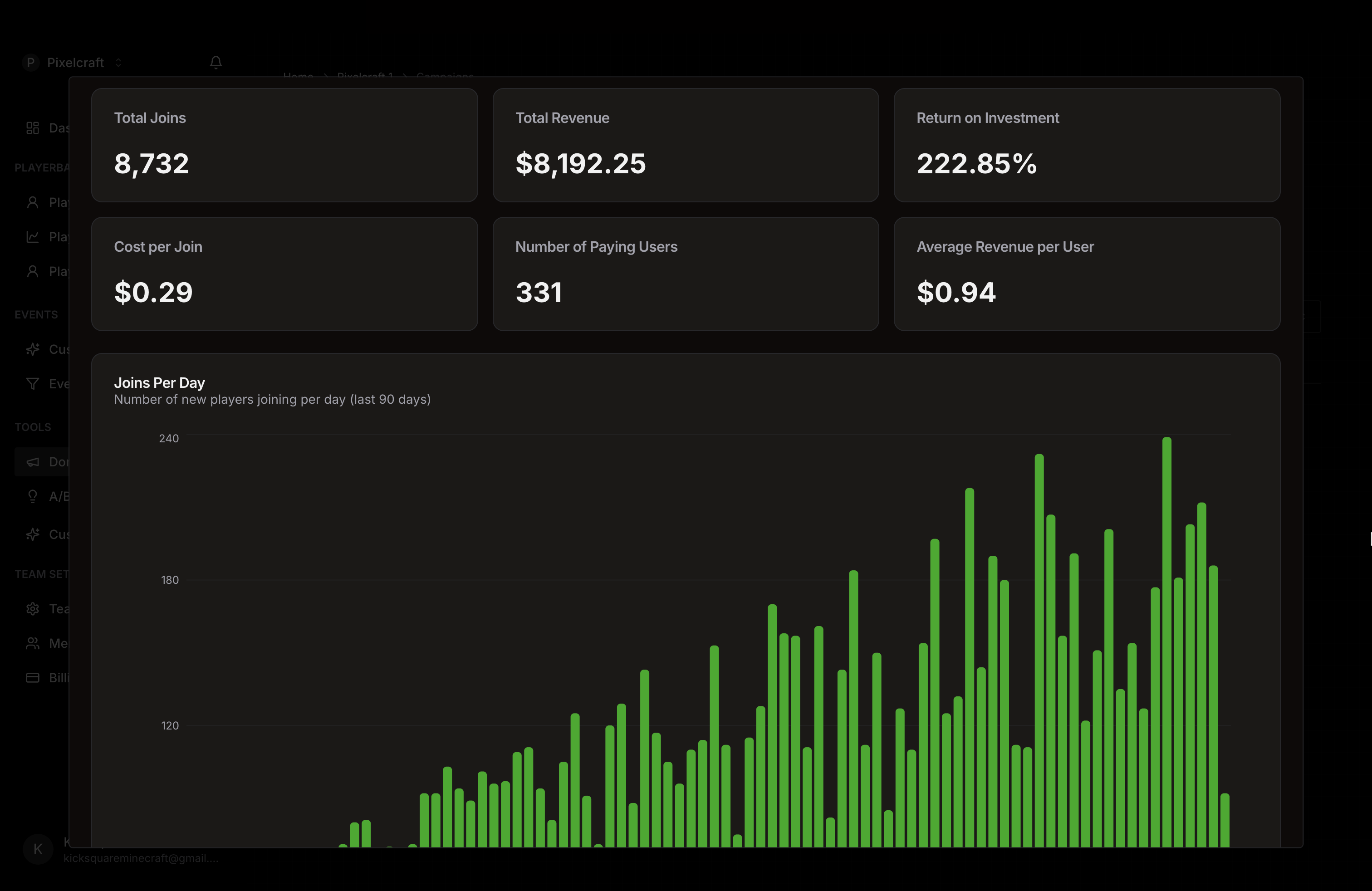
This will tell you:
- Total Joins: The number of players who have joined from this ad
- Total Revenue: The total revenue from players who joined from this ad
- Return on Investment (most important!): If Return on Investment is less than 100%, you are losing money on this ad. If it's greater than 100%, you are making money from this ad. For example, if your ad spend is $5,000 and your revenue is $10,000, your Return on Investment is 200% and you have made $5,000 of profit.
- Compare this value between campaigns to figure out which ones to spend more or less money on!
- Cost per Join: The amount you are paying for each player join
- Number of Paying Users: Of the people who joined from this ad, how many have made at least 1 purchase
Additional Stats
If you have a Premium subscription, you will have access to even more stats for this campaign, including the joins per day (as a chart), the top countries and languages from this campaign, and player retention. This can give you even more insights into the value of a campaign.